Quick Answer
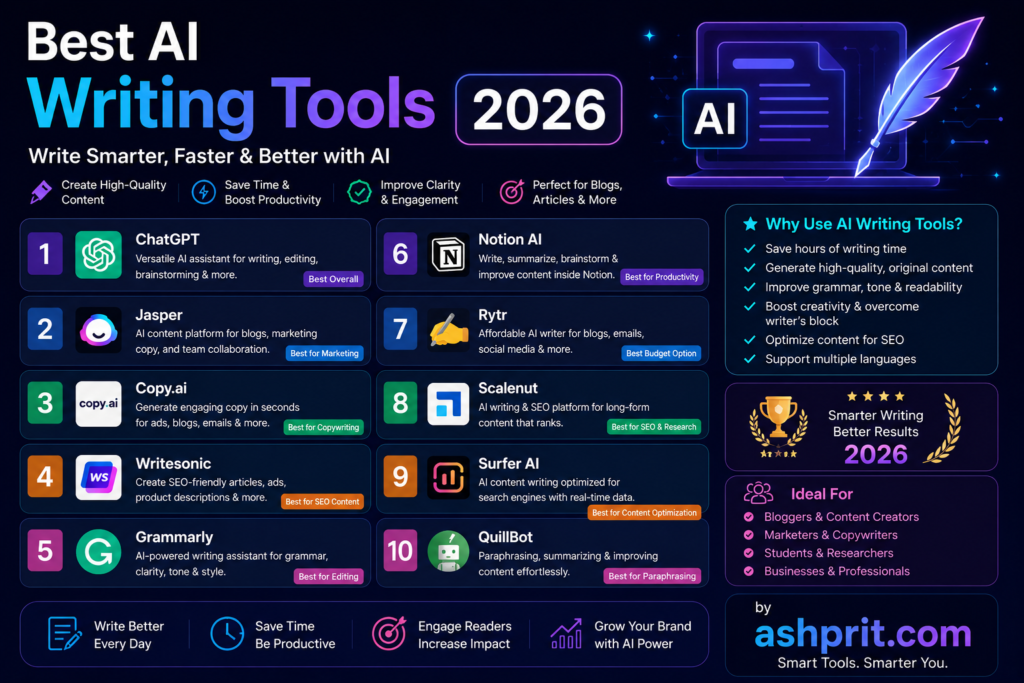
If you’re looking for the Best AI Writing Tools 2026, the top choices are ChatGPT, Claude, Google Gemini, Jasper AI, Writesonic, Copy.ai, Grammarly, Notion AI, Rytr, and QuillBot. Each tool excels in different tasks such as blog writing, copywriting, SEO content, email writing, academic writing, and business communication. This guide compares their features, pricing, strengths, and ideal use cases to help you choose the right AI writing assistant.
Key Takeaways
- The best AI writing tool depends on your goals, not just popularity.
- ChatGPT is the most versatile option for content creation.
- Claude excels at long-form writing and editing.
- Gemini integrates well with Google’s ecosystem.
- Jasper is built for marketing teams.
- Grammarly remains the best writing assistant for grammar and tone.
- Free AI writing tools are powerful enough for beginners.
- Businesses benefit from premium AI writing platforms with collaboration features.
Table of Contents
- What Are AI Writing Tools?
- Why AI Writing Tools Matter in 2026
- How We Tested These AI Writing Tools
- Quick Comparison Table
- ChatGPT
- Claude AI
- Google Gemini
- Jasper AI
- (Continued in Part 2)
What Are AI Writing Tools?
AI writing tools are software applications powered by large language models (LLMs) that help users generate, edit, summarize, rewrite, and improve written content. They use artificial intelligence to understand prompts and produce human-like text within seconds.
Unlike traditional grammar checkers, modern AI writing assistants can create complete blog posts, marketing copy, emails, product descriptions, social media captions, ad copy, academic content, documentation, scripts, and much more.
Whether you’re a student writing assignments, a blogger publishing articles, a marketer creating campaigns, or a business owner producing website content, AI writing tools can significantly improve productivity while maintaining quality.
Why AI Writing Tools Matter in 2026
Artificial intelligence has transformed the way people write. Instead of spending hours brainstorming ideas or editing drafts, writers can now use AI to generate outlines, improve readability, fix grammar, optimize SEO, and create engaging content in minutes.
Some of the biggest advantages include:
- Faster content creation
- Better grammar and readability
- Improved SEO optimization
- Consistent brand voice
- Multilingual writing support
- Content summarization
- Brainstorming and idea generation
- Higher productivity for teams
For businesses, AI writing tools reduce costs while helping teams produce more content without compromising quality.
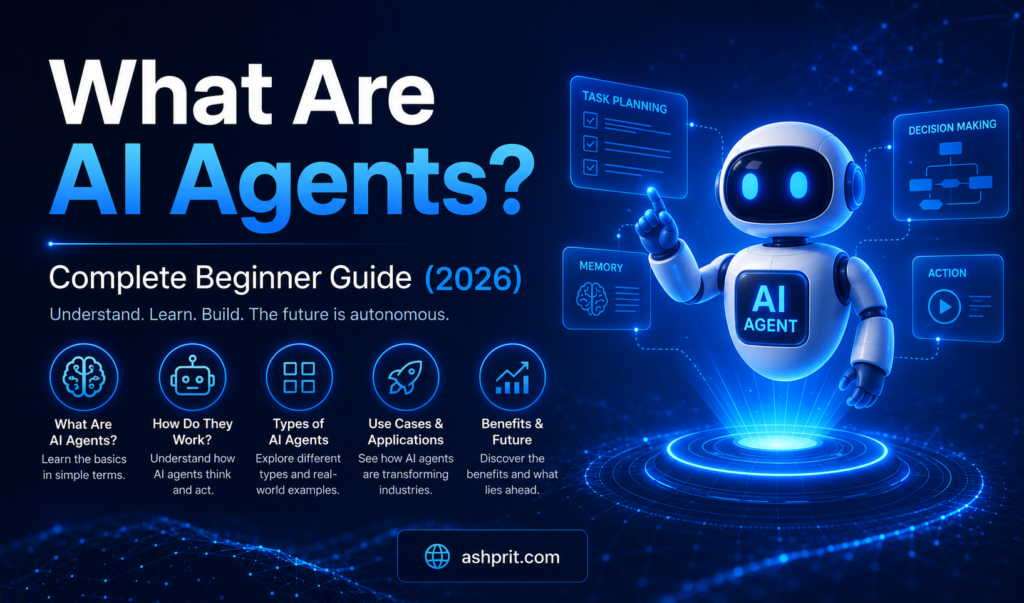
Learn how intelligent assistants work in What Are AI Agents?
How We Selected the Best AI Writing Tools 2026
Not every AI writing assistant deserves a place on this list. We evaluated each tool using practical criteria that matter to real users.
Evaluation Factors
- Writing quality
- Accuracy
- Creativity
- SEO capabilities
- Ease of use
- Collaboration features
- Supported languages
- Pricing
- Speed
- Value for money
- Integration with other tools
- Customer support
- Security and privacy
This approach ensures our recommendations are useful for beginners as well as professional writers.
Quick Comparison Table
| Tool | Best For | Free Plan | Starting Price |
|---|---|---|---|
| ChatGPT | Overall Writing | Yes | Paid plans available |
| Claude | Long-form Writing | Yes | Paid plans available |
| Gemini | Google Workspace Users | Yes | Paid plans available |
| Jasper | Marketing Teams | Trial | Premium |
| Writesonic | SEO Content | Yes | Paid |
| Copy.ai | Copywriting | Yes | Paid |
| Grammarly | Editing | Yes | Paid |
| Notion AI | Productivity | Paid Add-on | Premium |
| Rytr | Budget Writers | Yes | Low-cost |
| QuillBot | Rewriting | Yes | Paid |
1. ChatGPT
Overview
ChatGPT has become one of the most widely used AI writing tools in the world. It is capable of writing blog posts, emails, landing pages, scripts, social media captions, technical documentation, newsletters, business reports, and much more.
Its biggest advantage is flexibility. Instead of focusing on a single writing task, ChatGPT adapts to almost any writing style or format through detailed prompts.
For beginners, it simplifies content creation, while professionals use it to brainstorm ideas, improve drafts, and automate repetitive writing tasks.
Best Features
- Blog writing
- SEO content generation
- Email writing
- Content rewriting
- Idea generation
- Code explanations
- Research assistance
- Prompt customization
- Multilingual support
Pros
- Easy to use
- High-quality content
- Fast responses
- Suitable for almost every writing task
- Large ecosystem and integrations
Cons
- Requires good prompts for the best results
- Some advanced features are available only in paid plans
Best For
- Bloggers
- Students
- Freelancers
- Digital marketers
- Agencies
- Business owners
- Content creators
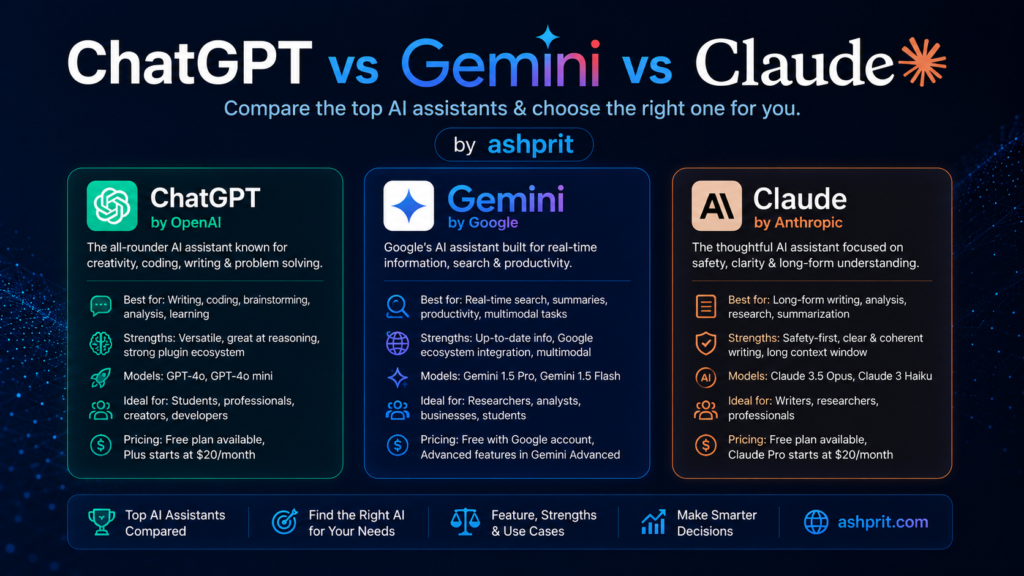
You can also read our detailed comparison ChatGPT vs Gemini vs Claude.
2. Claude AI
Overview
Claude AI has earned a strong reputation for producing natural, well-structured, and context-aware writing. It is particularly effective for long-form content such as detailed blog posts, reports, ebooks, documentation, and research summaries.
Many writers prefer Claude because it maintains coherence across lengthy articles and follows instructions with impressive accuracy. It is also useful for editing existing content by improving clarity, tone, and readability without changing the original meaning.
Best Features
- Long-form article writing
- Research summaries
- Content editing
- Natural writing style
- Large context window
- Brainstorming
- Professional reports
Pros
- Excellent long-form writing quality
- Strong reasoning capabilities
- Easy-to-read output
- Reliable for editing and rewriting
Cons
- Fewer marketing templates than some competitors
- Premium capabilities require a paid subscription
Best For
- Professional writers
- Researchers
- Agencies
- Technical writers
- Businesses creating documentation
3. Google Gemini
Overview
Google Gemini is designed for users who rely on the Google ecosystem. It integrates smoothly with services such as Docs, Gmail, Drive, and Workspace, making it a practical AI writing assistant for everyday productivity.
Gemini can generate articles, summarize documents, draft emails, create presentations, and help with research. Its access to Google’s ecosystem makes it especially useful for teams already using Workspace.
Best Features
- Google Docs integration
- Gmail assistance
- Document summarization
- Brainstorming
- Multilingual writing
- Workspace productivity
Pros
- Excellent integration with Google products
- Easy collaboration
- Fast content generation
- Helpful for daily office work
Cons
- Best experience is within Google’s ecosystem
- Some advanced capabilities require paid plans
Best For
- Students
- Office professionals
- Google Workspace users
- Small businesses
- Teams collaborating in Google Docs
4. Jasper AI
Overview
Jasper AI is built primarily for marketers and businesses that need high-volume, brand-consistent content. It offers templates for blog posts, landing pages, product descriptions, ad copy, email campaigns, and social media content.
One of Jasper’s biggest strengths is maintaining a consistent brand voice across multiple pieces of content, making it a popular choice for marketing teams and agencies.
Best Features
- Marketing templates
- Brand voice customization
- SEO-focused writing
- Team collaboration
- Campaign content generation
- Landing page creation
Pros
- Designed for professional marketing workflows
- Strong collaboration features
- Consistent brand messaging
- Time-saving templates
Cons
- More expensive than many alternatives
- Best suited for businesses rather than casual users
Best For
- Marketing agencies
- Businesses
- Content teams
- SEO professionals
- Copywriters
5. Writesonic
Overview
Writesonic is one of the most popular AI writing tools for marketers, bloggers, SEO professionals, and business owners. Unlike general-purpose AI assistants, Writesonic focuses heavily on creating SEO-friendly content that has the potential to rank in search engines.
One of its biggest strengths is its integration with SEO workflows. It can generate blog outlines, long-form articles, landing pages, Google Ads, Facebook Ads, product descriptions, and email campaigns while keeping search optimization in mind.
For users who regularly publish website content, Writesonic can significantly reduce research and writing time.
Best Features
- AI blog writer
- SEO article generation
- Landing page copy
- Product descriptions
- Email marketing
- Social media content
- AI paraphrasing
- Multiple language support
Pros
- Excellent for SEO-focused content
- Easy-to-use interface
- Fast article generation
- Marketing templates
- Suitable for agencies
Cons
- Long-form articles still require human editing
- Premium features require a subscription
Pricing
- Free Plan Available
- Paid plans available
Best For
- Bloggers
- SEO agencies
- Digital marketers
- Affiliate marketers
- Small businesses
6. Copy.ai
Overview
Copy.ai is designed specifically for copywriting. It helps users generate persuasive marketing content, advertisements, landing pages, product descriptions, email sequences, and sales copy.
Instead of writing lengthy informational articles, Copy.ai excels at creating short, conversion-focused content that encourages readers to take action.
Businesses that rely heavily on marketing campaigns often use Copy.ai to speed up creative workflows while maintaining consistent messaging.
Best Features
- Marketing copy
- Facebook Ads
- Google Ads
- Email campaigns
- Product descriptions
- Landing pages
- Sales copy
- Brand messaging
Pros
- Very beginner friendly
- Excellent marketing templates
- Fast content creation
- Clean interface
Cons
- Not ideal for very long blog posts
- Advanced features require paid plans
Pricing
- Free Plan Available
- Premium subscription available
Best For
- Marketing teams
- Sales professionals
- Ecommerce stores
- Startups
- Freelancers
7. Grammarly
Overview
Grammarly is more than a grammar checker. It has evolved into a complete AI writing assistant capable of improving grammar, spelling, punctuation, tone, readability, clarity, and sentence structure.
Unlike content generators, Grammarly focuses on enhancing existing writing rather than creating long-form articles from scratch.
Its browser extension makes it useful across emails, documents, social media platforms, and almost every website where writing is required.
Best Features
- Grammar correction
- Tone suggestions
- AI rewriting
- Plagiarism detection
- Style improvements
- Writing goals
- Browser extension
Pros
- Extremely accurate grammar checking
- Easy integration
- Improves readability
- Excellent for professional communication
Cons
- Limited content generation
- Premium plan required for advanced suggestions
Pricing
- Free Version
- Premium Version
Best For
- Students
- Professionals
- Business communication
- Academic writing
- Email writing
8. Notion AI
Overview
Notion AI combines note-taking, project management, documentation, and AI writing into a single workspace. Instead of switching between multiple apps, users can brainstorm, write, organize ideas, summarize meetings, and generate documentation within Notion itself.
This makes it an excellent choice for teams and individuals managing large amounts of information.
Best Features
- Note summarization
- Meeting notes
- Content generation
- Brainstorming
- Documentation
- Project planning
- Workflow organization
Pros
- Seamless Notion integration
- Great productivity features
- Excellent for collaborative work
- Organized knowledge management
Cons
- Requires a Notion workspace
- Less specialized for marketing content
Pricing
- AI Add-on available
- Premium plans
Best For
- Teams
- Startups
- Students
- Knowledge workers
- Project managers
9. Rytr
Overview
Rytr is one of the most affordable AI writing assistants available today. Despite its low price, it offers impressive capabilities for creating blog outlines, emails, social media captions, product descriptions, and marketing copy.
For beginners who do not want to invest in expensive AI subscriptions, Rytr provides a strong balance between affordability and functionality.
Best Features
- AI writing
- Email generation
- Social media content
- Blog outlines
- Business ideas
- Product descriptions
Pros
- Budget friendly
- Beginner friendly
- Easy interface
- Multiple templates
Cons
- Less advanced than premium competitors
- Long-form writing requires manual editing
Pricing
- Free Plan
- Affordable Premium Plan
Best For
- Students
- Freelancers
- Bloggers
- Small businesses
10. QuillBot
Overview
QuillBot specializes in rewriting and paraphrasing existing content. It is widely used by students, researchers, bloggers, and professionals who want to improve clarity without changing the original meaning.
Besides paraphrasing, QuillBot also includes grammar checking, summarization, citation generation, and plagiarism detection in some plans.
Best Features
- AI paraphrasing
- Grammar correction
- Summarizer
- Citation generator
- Vocabulary enhancement
Pros
- Excellent rewriting quality
- Simple interface
- Helpful academic features
- Multiple paraphrasing modes
Cons
- Limited long-form generation
- Premium features require subscription
Pricing
- Free Version
- Premium Version
Best For
- Students
- Researchers
- Bloggers
- Academic writers
11. Perplexity AI
Overview
Perplexity AI stands out because it combines AI writing with real-time web search. Instead of relying only on its training knowledge, it can provide up-to-date information and cite sources, making it useful for research-heavy writing.
Content creators often use Perplexity AI to gather facts, verify information, and build accurate outlines before drafting articles in another writing tool.
Best Features
- Real-time research
- Source citations
- Content summaries
- Fact checking
- AI search
- Research assistance
Pros
- Excellent for research
- Up-to-date information
- Source-backed answers
- Easy to use
Cons
- Less focused on marketing copy
- Premium features available
Pricing
- Free Plan
- Pro Plan
Best For
- Researchers
- Journalists
- Bloggers
- Students
- Content strategists
12. Sudowrite
Overview
Sudowrite is designed specifically for creative writers. Novelists, storytellers, scriptwriters, and fiction authors use it to generate ideas, develop characters, improve dialogue, and overcome writer’s block.
Unlike business-focused AI tools, Sudowrite emphasizes creativity and storytelling.
Best Features
- Story writing
- Character development
- Dialogue generation
- Plot expansion
- Creative brainstorming
- Writing inspiration
Pros
- Excellent creative writing
- Helps overcome writer’s block
- Strong storytelling assistance
- Easy interface
Cons
- Not ideal for SEO blogs
- Premium pricing
Pricing
- Paid Plans
Best For
- Authors
- Novelists
- Fiction writers
- Screenwriters
Feature Comparison Table
| Tool | Blog Writing | SEO | Marketing | Research | Grammar | Creative Writing |
|---|---|---|---|---|---|---|
| ChatGPT | ⭐⭐⭐⭐⭐ | ⭐⭐⭐⭐☆ | ⭐⭐⭐⭐⭐ | ⭐⭐⭐⭐☆ | ⭐⭐⭐⭐☆ | ⭐⭐⭐⭐⭐ |
| Claude | ⭐⭐⭐⭐⭐ | ⭐⭐⭐⭐☆ | ⭐⭐⭐⭐☆ | ⭐⭐⭐⭐⭐ | ⭐⭐⭐⭐☆ | ⭐⭐⭐⭐☆ |
| Gemini | ⭐⭐⭐⭐☆ | ⭐⭐⭐⭐☆ | ⭐⭐⭐⭐☆ | ⭐⭐⭐⭐⭐ | ⭐⭐⭐⭐☆ | ⭐⭐⭐⭐☆ |
| Jasper | ⭐⭐⭐⭐☆ | ⭐⭐⭐⭐⭐ | ⭐⭐⭐⭐⭐ | ⭐⭐⭐☆☆ | ⭐⭐⭐⭐☆ | ⭐⭐⭐☆☆ |
| Writesonic | ⭐⭐⭐⭐⭐ | ⭐⭐⭐⭐⭐ | ⭐⭐⭐⭐☆ | ⭐⭐⭐☆☆ | ⭐⭐⭐☆☆ | ⭐⭐⭐☆☆ |
| Copy.ai | ⭐⭐⭐☆☆ | ⭐⭐⭐☆☆ | ⭐⭐⭐⭐⭐ | ⭐⭐⭐☆☆ | ⭐⭐⭐☆☆ | ⭐⭐⭐☆☆ |
| Grammarly | ⭐⭐☆☆☆ | ⭐⭐☆☆☆ | ⭐⭐⭐☆☆ | ⭐⭐⭐☆☆ | ⭐⭐⭐⭐⭐ | ⭐⭐☆☆☆ |
| Notion AI | ⭐⭐⭐⭐☆ | ⭐⭐⭐☆☆ | ⭐⭐⭐☆☆ | ⭐⭐⭐⭐☆ | ⭐⭐⭐⭐☆ | ⭐⭐⭐☆☆ |
| Rytr | ⭐⭐⭐☆☆ | ⭐⭐⭐☆☆ | ⭐⭐⭐⭐☆ | ⭐⭐⭐☆☆ | ⭐⭐⭐☆☆ | ⭐⭐⭐☆☆ |
| QuillBot | ⭐⭐☆☆☆ | ⭐⭐⭐☆☆ | ⭐⭐☆☆☆ | ⭐⭐⭐☆☆ | ⭐⭐⭐⭐⭐ | ⭐⭐⭐☆☆ |
| Perplexity AI | ⭐⭐⭐☆☆ | ⭐⭐⭐⭐☆ | ⭐⭐⭐☆☆ | ⭐⭐⭐⭐⭐ | ⭐⭐⭐☆☆ | ⭐⭐⭐☆☆ |
| Sudowrite | ⭐⭐☆☆☆ | ⭐☆☆☆☆ | ⭐☆☆☆☆ | ⭐⭐☆☆☆ | ⭐⭐⭐☆☆ | ⭐⭐⭐⭐⭐ |
Who Should Choose Which Tool?
- Overall Best: ChatGPT
- Best for Long-Form Articles: Claude AI
- Best for Google Users: Gemini
- Best for Marketing Teams: Jasper AI
- Best for SEO Content: Writesonic
- Best for Copywriting: Copy.ai
- Best Grammar Assistant: Grammarly
- Best Productivity Workspace: Notion AI
- Best Budget Option: Rytr
- Best for Rewriting: QuillBot
- Best for Research: Perplexity AI
- Best for Fiction Writers: Sudowrite
Free vs Paid AI Writing Tools
One of the most common questions readers ask is whether a free AI writing tool is enough or if upgrading to a paid plan is worthwhile.
The answer depends on how often you create content and the type of work you do.
If you write occasionally, a free plan is usually sufficient. However, if you publish articles regularly, manage client projects, or run a business, premium features can significantly improve productivity and collaboration.
Free AI Writing Tools Are Best For
- Students
- Beginners
- Personal blogs
- Homework
- Basic email writing
- Social media captions
- Learning AI prompting
Popular free options include:
- ChatGPT (Free)
- Claude (Free)
- Gemini (Free)
- Rytr (Free)
- QuillBot (Free)
- Perplexity AI (Free)
Paid AI Writing Tools Are Best For
Premium plans generally offer:
- Higher usage limits
- Faster responses
- Better AI models
- Team collaboration
- Brand voice customization
- SEO workflows
- Project organization
- Priority support
These features are particularly valuable for agencies, content teams, and businesses publishing content at scale.
Best AI Writing Tool by Use Case
Choosing the right AI writing tool depends on your workflow rather than selecting the most popular option.
| Use Case | Recommended Tool |
|---|---|
| Blog Writing | ChatGPT |
| Long-form Articles | Claude AI |
| SEO Content | Writesonic |
| Marketing Copy | Jasper AI |
| Email Writing | Grammarly |
| Academic Writing | Claude AI |
| Research | Perplexity AI |
| Google Workspace | Gemini |
| Budget-Friendly | Rytr |
| Creative Writing | Sudowrite |
| Rewriting | QuillBot |
| Productivity | Notion AI |
AI Writing Prompt Tips
The quality of AI-generated content depends heavily on the quality of your prompt.
Weak Prompt
Write an article about AI.
This is too broad.
Better Prompt
Write a beginner-friendly guide explaining AI writing tools, including features, comparisons, pricing, advantages, disadvantages, and practical examples.
Excellent Prompt
Write a 3,500-word SEO-friendly article for beginners about AI writing tools. Use H2 and H3 headings, include comparison tables, practical examples, FAQs, and explain each recommendation in simple language.
The more context you provide, the better the output.
Common Mistakes to Avoid
Even the Best AI Writing Tools 2026 cannot produce perfect content without proper guidance.
Avoid these mistakes:
Copying AI Output Without Editing
Always review, fact-check, and personalize the content.
Ignoring SEO
AI can generate readable content, but it still needs proper headings, internal links, meta descriptions, and keyword optimization.
Overusing Keywords
Write naturally. Keyword stuffing reduces readability and can hurt search performance.
Skipping Fact Verification
When writing about current events, pricing, product features, or regulations, verify important facts using official sources.
Publishing Without Human Review
AI should accelerate your workflow, not replace editorial judgment.
Expert Tips
Here are some practical ways to improve results with AI writing tools:
- Start with a clear outline.
- Use AI for the first draft, then edit manually.
- Add your own examples and insights.
- Include screenshots, tables, and comparisons.
- Link to related articles on your website.
- Keep paragraphs short for better readability.
- Update evergreen articles regularly.
Future of AI Writing
AI writing tools are evolving quickly.
In the coming years, we can expect:
- Better multilingual support
- Improved factual accuracy
- More personalized writing
- Deeper integration with productivity software
- AI-powered content research
- Better collaboration features
- Smarter SEO recommendations
- Voice-to-article workflows
Writers who combine AI with their own expertise are likely to produce the highest-quality content.
Frequently Asked Questions
Which is the best AI writing tool in 2026?
ChatGPT remains one of the strongest all-round choices, while Claude AI, Gemini, Jasper AI, and Writesonic each excel in specific use cases.
Which AI writing tool is best for bloggers?
ChatGPT, Claude AI, and Writesonic are excellent choices for creating blog content.
Is ChatGPT better than Jasper AI?
ChatGPT offers greater flexibility across many writing tasks, while Jasper AI is designed specifically for marketing teams and brand-focused content.
Which AI writing tool is best for SEO?
Writesonic is built with SEO workflows in mind. ChatGPT and Claude AI are also strong options when combined with good SEO practices.
Which AI writing tool is free?
Several tools provide free tiers, including ChatGPT, Claude, Gemini, Rytr, QuillBot, and Perplexity AI.
Which AI writing assistant is best for students?
Claude AI, ChatGPT, Gemini, and QuillBot are particularly useful for study support, writing assistance, and summarization.
Students should also check our guide Best AI Tools for Students in 2026.
Can AI replace human writers?
No. AI is an assistant that can speed up research and drafting, but human expertise is still essential for originality, accuracy, editorial judgment, and brand voice.
Is AI-generated content good for SEO?
AI-generated content can perform well when it is accurate, original, helpful, and edited by humans. Strong structure, internal linking, and real expertise remain important.
Which AI tool is best for marketing?
Jasper AI and Copy.ai are built for marketing workflows, while ChatGPT is versatile enough to support many marketing tasks.
Which AI tool is best for long-form content?
Claude AI is widely appreciated for maintaining context and coherence across long documents.
Final Verdict
After evaluating the Best AI Writing Tools 2026, it’s clear that there is no single “perfect” tool for everyone.
- ChatGPT is the most versatile option for everyday writing.
- Claude AI is excellent for long-form articles and editing.
- Gemini works well for users invested in Google Workspace.
- Jasper AI remains a strong choice for marketing teams.
- Writesonic is well suited for SEO-focused content.
- Grammarly continues to lead in grammar and style improvements.
- Perplexity AI adds value through research and source-backed information.
- QuillBot is a dependable rewriting assistant.
The best approach for many professionals is to combine tools based on the task—for example, using Perplexity AI for research, ChatGPT or Claude for drafting, and Grammarly for polishing the final version.
Key Takeaways
- AI writing tools save time and improve productivity.
- Different tools excel in different workflows.
- Human editing remains essential.
- Choose tools based on your goals, not just popularity.
- Regularly review and update content to keep it accurate and useful.
Related Articles
Continue your AI learning journey with these guides on Ashprit.com:
- Top 25 AI Tools You Should Use in 2026
- Best AI Coding Tools in 2026
- Best AI Tools for Students in 2026
- Perplexity AI Review 2026
- ChatGPT vs Gemini vs Claude
- What Are AI Agents?
- What Is AEO?
- What Is GEO?
- AEO vs GEO vs SEO
If you’re exploring more AI software, don’t miss our guide on Top 25 AI Tools You Should Use in 2026.