Best AI Coding Tools in 2026 (Free & Paid)
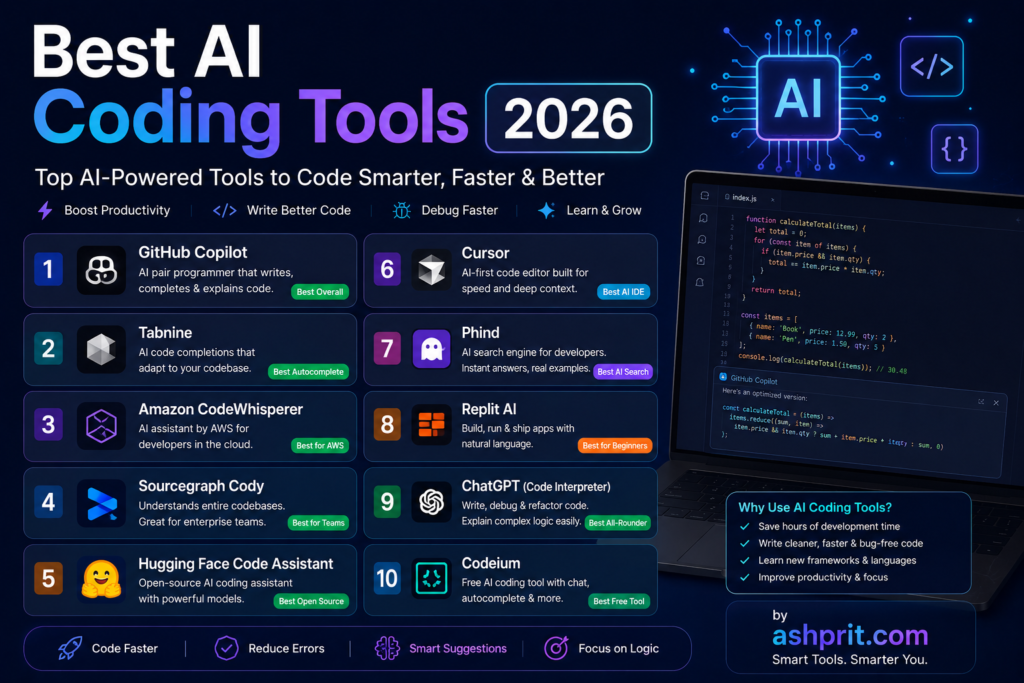
Artificial intelligence is transforming software development faster than ever before. The Best AI Coding Tools 2026 help developers write cleaner code, debug applications, generate functions, explain complex logic, and complete projects in significantly less time. Whether you are a beginner learning Python or a professional software engineer building enterprise applications, AI-powered coding assistants have become an essential part of modern development.
In this comprehensive guide, you’ll discover the Best AI Coding Tools 2026, compare their features, pricing, strengths, weaknesses, and understand which tool is the right choice for your workflow.
This guide covers tools for:
- Python
- JavaScript
- React
- Node.js
- PHP
- Java
- C++
- C#
- Go
- Rust
- SQL
- HTML & CSS
Whether you’re building websites, mobile apps, APIs, AI projects, automation scripts, or enterprise software, this guide will help you choose the Best AI Coding Tools 2026.
Table of Contents
- Why AI Coding Tools Matter in 2026
- How We Selected the Best AI Coding Tools
- Quick Comparison Table
- GitHub Copilot
- Cursor AI
- ChatGPT
- Claude AI
- Gemini
- Windsurf
- Codeium
- Amazon Q Developer
- Tabnine
- Replit AI
- Continue.dev
- Pricing Comparison
- Which Tool Is Best for Beginners?
- Which Tool Is Best for Professionals?
- FAQs
- Final Verdict
Why AI Coding Tools Matter in 2026
Software development has changed dramatically over the past few years. Developers no longer spend hours writing repetitive boilerplate code or manually searching documentation for every problem. Modern AI coding assistants can generate code snippets, explain programming concepts, detect bugs, suggest optimizations, and even create entire project structures.
The Best AI Coding Tools 2026 are designed to improve productivity without replacing developers. Instead of taking over programming, these tools act as intelligent assistants that help developers focus on solving problems rather than repetitive coding tasks.
Key benefits include:
- Faster code generation
- Automatic bug detection
- Intelligent code completion
- Better documentation
- Reduced development time
- Improved code quality
- Faster debugging
- Learning support for beginners
For teams, AI coding assistants also improve collaboration by generating consistent code and reducing manual errors.
How We Selected the Best AI Coding Tools
Not every AI coding assistant deserves a place on this list. We evaluated each tool based on practical, real-world usage rather than marketing claims.
Our evaluation criteria included:
Coding Accuracy
Can the AI generate functional and correct code?
Debugging Ability
How effectively can it identify and fix coding errors?
Programming Language Support
Does it support Python, JavaScript, Java, C++, PHP, Go, Rust, and other popular languages?
IDE Integration
Does it work smoothly with VS Code, JetBrains IDEs, Visual Studio, Cursor, and cloud environments?
Speed
How quickly does the AI respond to coding requests?
Security
Does the platform prioritize code privacy and enterprise security?
Pricing
Is the free version useful, and does the paid version provide good value?
Beginner Friendliness
Can new programmers understand the AI’s explanations?
Productivity
Does it genuinely save development time?
Quick Comparison Table
| Tool | Best For | Free Plan | Rating |
|---|---|---|---|
| GitHub Copilot | Professionals | No (Trial) | ⭐⭐⭐⭐⭐ |
| Cursor AI | Full AI IDE | Yes | ⭐⭐⭐⭐⭐ |
| ChatGPT | Learning & Coding | Yes | ⭐⭐⭐⭐⭐ |
| Claude AI | Large Codebases | Yes | ⭐⭐⭐⭐⭐ |
| Gemini | Google Ecosystem | Yes | ⭐⭐⭐⭐☆ |
| Windsurf | AI Development | Yes | ⭐⭐⭐⭐⭐ |
| Codeium | Free Developers | Yes | ⭐⭐⭐⭐☆ |
| Amazon Q Developer | AWS Users | Yes | ⭐⭐⭐⭐☆ |
| Tabnine | Enterprise Teams | Limited | ⭐⭐⭐⭐☆ |
| Replit AI | Cloud Coding | Yes | ⭐⭐⭐⭐☆ |
1. GitHub Copilot
What is GitHub Copilot?
GitHub Copilot is one of the most widely used AI coding assistants in the world. Developed through a collaboration between GitHub and OpenAI, it integrates directly into popular code editors and helps developers write code faster by suggesting complete lines, functions, and even entire classes in real time.
Many professional developers consider GitHub Copilot one of the Best AI Coding Tools 2026 because it integrates seamlessly with existing workflows and significantly reduces repetitive coding.
Key Features
- AI-powered code completion
- Function generation
- Documentation creation
- Unit test generation
- Error suggestions
- Multi-language support
- VS Code integration
- JetBrains integration
- Visual Studio support
- GitHub ecosystem integration
Pros
- Extremely accurate suggestions
- Saves significant development time
- Excellent IDE integration
- Supports dozens of programming languages
- Great for experienced developers
Cons
- Paid subscription required after trial
- May occasionally generate inefficient code
- Requires review before production use
Pricing
- Free Trial
- Individual Plan
- Business Plan
- Enterprise Plan
Best For
- Professional Developers
- Software Engineers
- Backend Developers
- Full Stack Developers
- Enterprise Teams
Why GitHub Copilot Is One of the Best AI Coding Tools 2026
GitHub Copilot stands out because it understands project context and predicts what developers are trying to build. Instead of simply completing the current line, it can generate entire logical blocks of code, making it one of the Best AI Coding Tools 2026 for professional software development.
2. Cursor AI
What is Cursor AI?
Cursor AI is a next-generation AI-powered code editor built specifically for software developers. Unlike traditional editors that rely on plugins, Cursor AI integrates artificial intelligence into the core editing experience.
Because of its deep project awareness and conversational coding features, Cursor AI has quickly become one of the Best AI Coding Tools 2026 for developers working on large applications.
Key Features
- AI chat inside the editor
- Project-wide understanding
- Smart code generation
- Instant bug fixing
- Code explanations
- Refactoring suggestions
- Multi-file editing
- Context-aware responses
- Natural language programming
Pros
- Very fast
- Excellent UI
- Understands entire projects
- Great debugging capabilities
- Beginner friendly
Cons
- Learning curve for new users
- Premium features require a subscription
- Heavy projects may consume more resources
Pricing
- Free Plan
- Pro Plan
- Business Plan
Best For
- Startups
- Freelancers
- Full Stack Developers
- AI Engineers
- Web Developers
Why Cursor AI Is Among the Best AI Coding Tools 2026
Cursor AI combines the power of modern language models with a purpose-built development environment. Developers can ask questions, generate code, refactor files, and debug applications without leaving the editor, making it one of the Best AI Coding Tools 2026 available today.
3. ChatGPT
What is ChatGPT?
ChatGPT is one of the most powerful AI assistants available today and has become an essential coding companion for millions of developers. From generating code snippets to debugging complex applications, ChatGPT helps programmers work faster and understand difficult programming concepts.
Although ChatGPT is a general-purpose AI assistant, its coding capabilities make it one of the Best AI Coding Tools 2026 for beginners and professionals alike.
Key Features
- Generate code in multiple programming languages
- Debug existing code
- Explain complex algorithms
- Create SQL queries
- Write regular expressions
- Generate APIs
- Build automation scripts
- Convert code between programming languages
- Optimize existing code
- Create documentation
Pros
- Beginner friendly
- Excellent explanations
- Supports almost every programming language
- Strong debugging capabilities
- Great for learning new technologies
Cons
- Generated code should always be reviewed
- Internet-based features depend on the selected model
- Long conversations may require careful prompt management
Pricing
- Free Plan
- Plus Plan
- Team Plan
- Enterprise Plan
Best For
- Students
- Freelancers
- Full Stack Developers
- Backend Developers
- Learning Programming
Why ChatGPT Is One of the Best AI Coding Tools 2026
ChatGPT combines coding assistance with explanations, making it ideal for developers who want to understand why code works—not just copy it.
4. Claude AI
What is Claude AI?
Claude AI, developed by Anthropic, is known for handling long conversations and understanding large codebases. It performs particularly well when reviewing multiple files, explaining architecture, and suggesting improvements.
For developers working on enterprise applications, Claude AI deserves a place among the Best AI Coding Tools 2026.
Key Features
- Long context window
- Code review
- Architecture explanations
- Documentation writing
- Bug detection
- Refactoring suggestions
- Multi-language support
Pros
- Excellent for large projects
- Clear explanations
- Strong reasoning
- High-quality documentation
Cons
- Limited availability in some regions
- Advanced features depend on subscription
Best For
- Enterprise Developers
- Software Architects
- Senior Engineers
- Documentation Teams
5. Google Gemini
What is Gemini?
Google Gemini integrates deeply with Google’s ecosystem and provides AI-powered coding assistance for developers working with Android, Firebase, Google Cloud, and web technologies.
Its tight integration with Google’s developer tools makes it one of the Best AI Coding Tools 2026 for developers already using Google services.
Key Features
- Code generation
- Bug fixing
- Google Cloud integration
- Android Studio support
- API suggestions
- Documentation assistance
Pros
- Strong Google ecosystem
- Fast responses
- Free access available
- Helpful explanations
Cons
- Some advanced capabilities require premium access
- Performance may vary by task
Best For
- Android Developers
- Google Cloud Developers
- Students
- Web Developers
6. Windsurf
What is Windsurf?
Windsurf is a modern AI-first code editor designed to improve developer productivity with intelligent code generation, debugging, and project awareness.
It has quickly gained popularity because it focuses on reducing repetitive coding work while keeping developers in control.
Key Features
- AI coding assistant
- Context-aware suggestions
- Multi-file editing
- Intelligent debugging
- Fast autocomplete
- Refactoring tools
Pros
- Modern interface
- Excellent speed
- AI integrated directly into the editor
- Smooth workflow
Cons
- Smaller ecosystem than some competitors
- Advanced features require a paid plan
Best For
- Web Developers
- Startup Teams
- Freelancers
7. Codeium
What is Codeium?
Codeium is a free AI coding assistant that offers intelligent code completion, code generation, and chat-based programming support.
For developers looking for a free alternative, Codeium is one of the Best AI Coding Tools 2026.
Key Features
- AI autocomplete
- Code explanation
- Chat assistant
- IDE integrations
- Multi-language support
Pros
- Generous free plan
- Fast suggestions
- Supports popular IDEs
- Easy setup
Cons
- Enterprise features are limited
- Smaller ecosystem than GitHub Copilot
Best For
- Students
- Beginners
- Freelancers
- Budget-conscious developers
8. Amazon Q Developer
What is Amazon Q Developer?
Amazon Q Developer is Amazon’s AI coding assistant designed to help developers build, debug, and deploy applications, especially within the AWS ecosystem.
It provides recommendations based on AWS best practices and integrates with cloud development workflows.
Key Features
- AWS integration
- AI code generation
- Cloud deployment assistance
- Security recommendations
- Documentation support
Pros
- Excellent for AWS users
- Cloud-focused features
- Enterprise support
- Secure workflows
Cons
- Best suited for AWS environments
- Less useful for non-cloud projects
Best For
- Cloud Developers
- DevOps Engineers
- AWS Professionals
9. Tabnine
What is Tabnine?
Tabnine is an AI-powered coding assistant focused on secure code completion and enterprise development.
Organizations choose Tabnine because of its emphasis on privacy and customizable AI models.
Key Features
- AI autocomplete
- Private deployment
- Enterprise security
- Team collaboration
- IDE support
Pros
- Privacy-focused
- Enterprise ready
- Fast suggestions
- Easy integration
Cons
- Premium features require a subscription
- Smaller community compared to GitHub Copilot
Best For
- Enterprise Teams
- Secure Development
- Corporate Projects
10. Replit AI
What is Replit AI?
Replit AI brings artificial intelligence directly into a browser-based coding environment, allowing developers to write, test, and deploy applications without installing a local IDE.
It is especially useful for learning programming and rapid prototyping.
Key Features
- Browser IDE
- AI coding assistant
- Instant deployment
- Collaboration
- Code explanation
Pros
- No installation required
- Beginner friendly
- Cloud development
- Great collaboration tools
Cons
- Performance depends on internet connection
- Heavy enterprise projects may require desktop IDEs
Best For
- Students
- Beginners
- Coding Bootcamps
- Rapid Prototyping
Free vs Paid AI Coding Tools
| Tool | Free Version | Paid Version | Best For |
|---|---|---|---|
| GitHub Copilot | Trial | Yes | Professional Development |
| Cursor AI | Yes | Yes | Full AI IDE |
| ChatGPT | Yes | Yes | Learning & Coding |
| Claude AI | Yes | Yes | Large Codebases |
| Gemini | Yes | Yes | Google Ecosystem |
| Windsurf | Yes | Yes | Modern Development |
| Codeium | Yes | Yes | Free AI Coding |
| Amazon Q Developer | Yes | Yes | AWS Development |
| Tabnine | Limited | Yes | Enterprise Security |
| Replit AI | Yes | Yes | Cloud Development |
Which AI Coding Tool Should You Choose?
Beginners
- ChatGPT
- Codeium
- Replit AI
Students
- ChatGPT
- Gemini
- Codeium
Professional Developers
- GitHub Copilot
- Cursor AI
- Claude AI
Enterprise Teams
- GitHub Copilot Business
- Tabnine
- Amazon Q Developer
Cloud Developers
- Amazon Q Developer
- Gemini
- GitHub Copilot
Best AI Coding Tool by Programming Language
Every programming language has different requirements. Some AI coding assistants perform exceptionally well with specific technologies.
Python
Python developers should consider:
- GitHub Copilot
- ChatGPT
- Claude AI
- Cursor AI
These tools excel in data science, machine learning, automation, and backend development.
JavaScript
For JavaScript and TypeScript development:
- Cursor AI
- GitHub Copilot
- ChatGPT
- Windsurf
These tools provide excellent React, Next.js, Vue, Node.js, and Express support.
Java
Recommended tools:
- GitHub Copilot
- Claude AI
- Amazon Q Developer
These AI assistants help enterprise Java developers generate cleaner code and improve productivity.
C++
Recommended:
- ChatGPT
- GitHub Copilot
- Claude AI
These tools explain algorithms and optimize performance-critical code.
PHP
Best options:
- GitHub Copilot
- Cursor AI
- ChatGPT
Ideal for Laravel, WordPress, and custom PHP applications.
Go
Recommended:
- Claude AI
- GitHub Copilot
- Cursor AI
Rust
Best choices:
- ChatGPT
- GitHub Copilot
- Claude AI
SQL
Excellent AI tools include:
- ChatGPT
- GitHub Copilot
- Gemini
They help generate optimized SQL queries, joins, stored procedures, and database designs.
Performance Comparison
| Tool | Speed | Accuracy | Learning | Enterprise | Overall |
|---|---|---|---|---|---|
| GitHub Copilot | ⭐⭐⭐⭐⭐ | ⭐⭐⭐⭐⭐ | ⭐⭐⭐⭐☆ | ⭐⭐⭐⭐⭐ | ⭐⭐⭐⭐⭐ |
| Cursor AI | ⭐⭐⭐⭐⭐ | ⭐⭐⭐⭐⭐ | ⭐⭐⭐⭐⭐ | ⭐⭐⭐⭐☆ | ⭐⭐⭐⭐⭐ |
| ChatGPT | ⭐⭐⭐⭐⭐ | ⭐⭐⭐⭐☆ | ⭐⭐⭐⭐⭐ | ⭐⭐⭐⭐☆ | ⭐⭐⭐⭐⭐ |
| Claude AI | ⭐⭐⭐⭐☆ | ⭐⭐⭐⭐⭐ | ⭐⭐⭐⭐⭐ | ⭐⭐⭐⭐⭐ | ⭐⭐⭐⭐⭐ |
| Gemini | ⭐⭐⭐⭐☆ | ⭐⭐⭐⭐☆ | ⭐⭐⭐⭐☆ | ⭐⭐⭐⭐☆ | ⭐⭐⭐⭐☆ |
| Windsurf | ⭐⭐⭐⭐⭐ | ⭐⭐⭐⭐☆ | ⭐⭐⭐⭐☆ | ⭐⭐⭐⭐☆ | ⭐⭐⭐⭐☆ |
| Codeium | ⭐⭐⭐⭐☆ | ⭐⭐⭐⭐☆ | ⭐⭐⭐⭐☆ | ⭐⭐⭐☆☆ | ⭐⭐⭐⭐☆ |
| Amazon Q Developer | ⭐⭐⭐⭐☆ | ⭐⭐⭐⭐⭐ | ⭐⭐⭐⭐☆ | ⭐⭐⭐⭐⭐ | ⭐⭐⭐⭐☆ |
| Tabnine | ⭐⭐⭐⭐☆ | ⭐⭐⭐⭐☆ | ⭐⭐⭐⭐☆ | ⭐⭐⭐⭐⭐ | ⭐⭐⭐⭐☆ |
| Replit AI | ⭐⭐⭐⭐☆ | ⭐⭐⭐⭐☆ | ⭐⭐⭐⭐⭐ | ⭐⭐⭐☆☆ | ⭐⭐⭐⭐☆ |
Security & Privacy
When using the Best AI Coding Tools 2026, always think about code privacy.
Follow these best practices:
- Never paste API keys.
- Remove passwords before sharing code.
- Avoid uploading confidential client projects.
- Review generated code before deploying it.
- Check open-source license compatibility where relevant.
- Follow your organization’s security policies.
AI should assist your development process—not replace secure coding practices.
Common Mistakes Developers Make
Many developers use AI incorrectly.
Avoid these common mistakes:
1. Blindly Copying Code
Always understand what AI generates.
2. Ignoring Security
AI-generated code may need security improvements.
Review authentication, validation, and error handling carefully.
3. Not Testing Code
Always test AI-generated code before production deployment.
4. Poor Prompts
Bad Prompt:
Create login.
Good Prompt:
Create a secure JWT authentication system in Node.js using Express with refresh tokens and role-based authorization.
Better prompts usually produce better results.
5. Ignoring Documentation
Even if AI generates working code, reading the official documentation helps you understand best practices and long-term maintenance.
Tips to Get Better Results
To make the most of the Best AI Coding Tools 2026, try these techniques:
- Describe the programming language clearly.
- Mention the framework (React, Laravel, Django, etc.).
- Specify coding standards if your team uses them.
- Ask for comments in generated code.
- Request performance improvements after the initial solution.
- Ask AI to explain complex sections before using them.
Frequently Asked Questions (FAQ)
Which is the best AI coding tool in 2026?
GitHub Copilot, Cursor AI, ChatGPT, and Claude AI are among the strongest choices. The best option depends on your workflow, programming language, and budget.
Which AI coding tool is best for beginners?
ChatGPT, Codeium, and Replit AI are excellent for beginners because they explain concepts while generating code.
Is GitHub Copilot worth paying for?
For developers who write code daily, GitHub Copilot can save time on repetitive tasks and improve productivity. Evaluate whether its workflow fits your needs before subscribing.
Can AI replace software developers?
No.
AI assists developers by automating repetitive work, suggesting code, and explaining concepts. Human developers are still needed for architecture, design, problem-solving, security decisions, and business logic.
Which AI tool is best for Python?
GitHub Copilot, ChatGPT, Cursor AI, and Claude AI are strong choices for Python development.
Which AI tool is best for JavaScript?
Cursor AI, GitHub Copilot, and ChatGPT perform very well with JavaScript and TypeScript projects.
Are AI coding tools safe?
Most reputable AI coding assistants are safe when used responsibly. However, developers should avoid sharing confidential code or credentials and should always review AI-generated output.
Which AI coding tool is completely free?
Codeium offers one of the most generous free plans. ChatGPT, Gemini, Replit AI, and Cursor AI also provide useful free tiers with varying limitations.
Final Verdict
Artificial intelligence has become a valuable coding companion rather than a replacement for developers. The Best AI Coding Tools 2026 help programmers write code faster, understand unfamiliar technologies, reduce repetitive work, and improve productivity across many programming languages.
Each tool has its strengths:
- GitHub Copilot – Excellent for professional software development and IDE integration.
- Cursor AI – A powerful AI-first code editor with strong project awareness.
- ChatGPT – Great for learning, debugging, brainstorming, and explaining code.
- Claude AI – Strong reasoning and excellent handling of large codebases.
- Gemini – Useful for developers working within the Google ecosystem.
- Codeium – A solid free option for students and independent developers.
- Amazon Q Developer – Best suited for AWS-focused workflows.
- Tabnine – A privacy-focused option for enterprise teams.
- Replit AI – Ideal for browser-based coding and collaborative learning.
Rather than relying on a single tool, many experienced developers combine multiple AI assistants depending on the task. For example, one tool may be ideal for code completion while another excels at architecture discussions or debugging.
The right choice ultimately depends on your experience level, preferred programming languages, development environment, and budget.
Key Takeaways
- ✅ AI coding tools improve productivity but do not replace developers.
- ✅ Review and test AI-generated code before deployment.
- ✅ Choose tools based on your programming language and workflow.
- ✅ Free plans are sufficient for many students and beginners.
- ✅ Professional developers often benefit from premium features.
Related Articles
Continue exploring AI with these guides: